What happened?
~
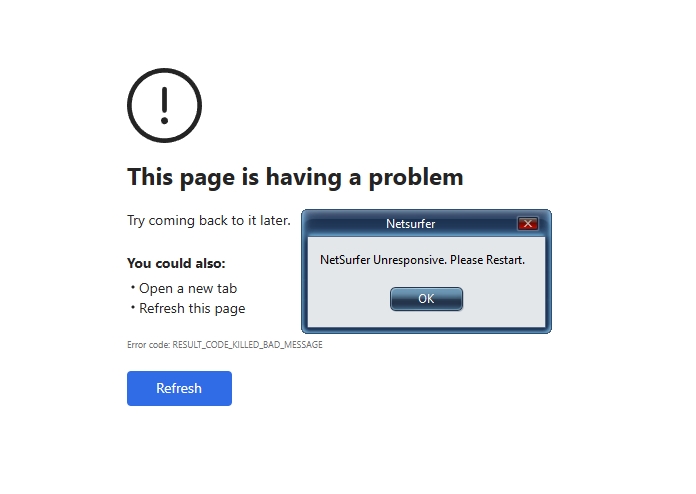
When navigating to "edge://history/all" an error page is given.
The History page displays for a second or two then presents the below web page with an error message...
Importance
Important. My app's user experience is significantly compromised.
Runtime Channel
Stable release (WebView2 Runtime)
Runtime Version
148.0.3967.54
SDK Version
1.0.3912.50
Framework
Win32
Operating System
Windows 10
OS Version
19045.6466
Repro steps
Simply open up an instance of a WebView2 application and navigate to the following URL:
edge://history/all
That is it, an error page will then present itself after displaying the "History Page" for a second then changing to an error page. All other security settings are set to default, so it must open as normal.
This function worked perfectly yesterday before the latest WebView2 runtime Control update on 2026-05-07.
Get this fixed... The error rate on this control is getting out of hand!
Repros in Edge Browser
No, issue does not reproduce in the corresponding Edge version
Regression
Regression in newer Runtime
Last working version (if regression)
147.0.3912.98


What happened?
~
When navigating to "edge://history/all" an error page is given.
The History page displays for a second or two then presents the below web page with an error message...
Importance
Important. My app's user experience is significantly compromised.
Runtime Channel
Stable release (WebView2 Runtime)
Runtime Version
148.0.3967.54
SDK Version
1.0.3912.50
Framework
Win32
Operating System
Windows 10
OS Version
19045.6466
Repro steps
Simply open up an instance of a WebView2 application and navigate to the following URL:
edge://history/all
That is it, an error page will then present itself after displaying the "History Page" for a second then changing to an error page. All other security settings are set to default, so it must open as normal.
This function worked perfectly yesterday before the latest WebView2 runtime Control update on 2026-05-07.
Get this fixed... The error rate on this control is getting out of hand!
Repros in Edge Browser
No, issue does not reproduce in the corresponding Edge version
Regression
Regression in newer Runtime
Last working version (if regression)
147.0.3912.98